
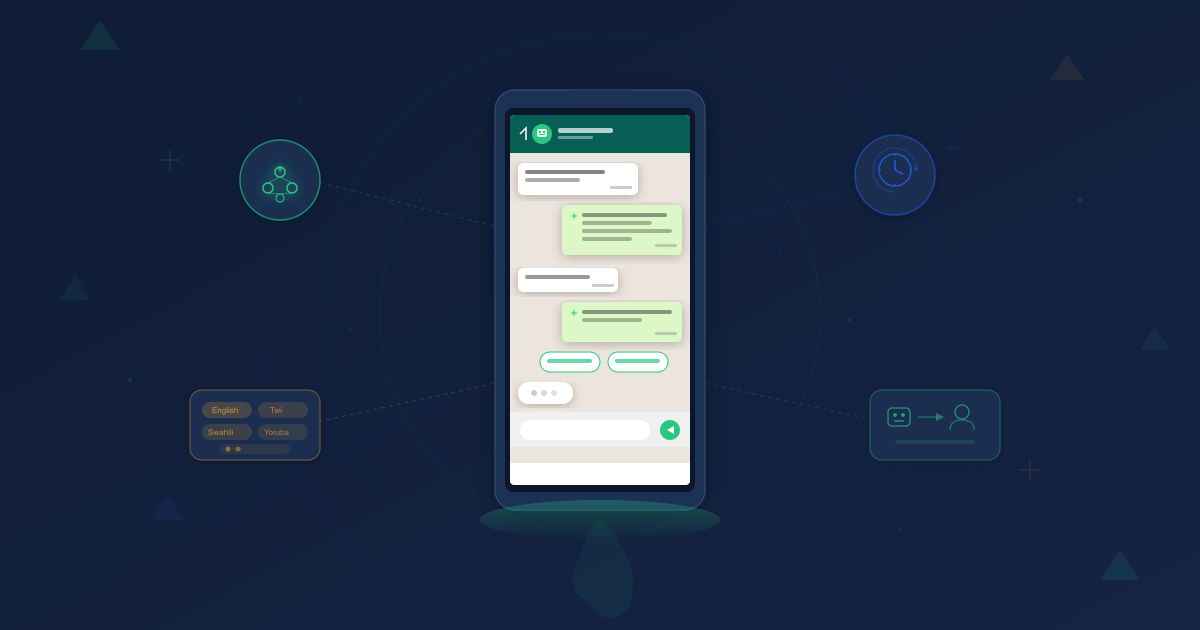
In Ghana, Nigeria, Kenya, and South Africa, over 70% of internet users are on WhatsApp. Your customers are already there. The question is whether your business can keep up.
Most businesses still rely on manual responses. A team member checks WhatsApp between tasks, replies when they can, and hopes nothing falls through the cracks. That approach breaks the moment you scale past a handful of daily conversations.
An AI chatbot for WhatsApp Business in Africa changes the equation. It responds instantly, handles routine queries around the clock, and frees your team to focus on conversations that actually need a human touch. This guide walks you through the complete setup — from getting API access to going live with an AI chatbot built for African markets.
For the strategic view on why WhatsApp CRM for African businesses is transforming customer engagement across the continent, start with our pillar guide.
What Is a WhatsApp AI Chatbot (and How Is It Different from a Basic Bot)?
Before diving into setup, let’s clarify the tools you’re working with.
WhatsApp Business App is the free app designed for small businesses. It supports quick replies, labels, and a product catalog. But it’s limited to one device, manual responses, and no automation beyond canned messages.
WhatsApp Business API (now called the WhatsApp Business Platform) is the enterprise-grade version. It connects to external systems, supports automation, handles unlimited conversations, and integrates with AI chatbots. You access it through a Business Solution Provider (BSP) — more on that in Step 1.
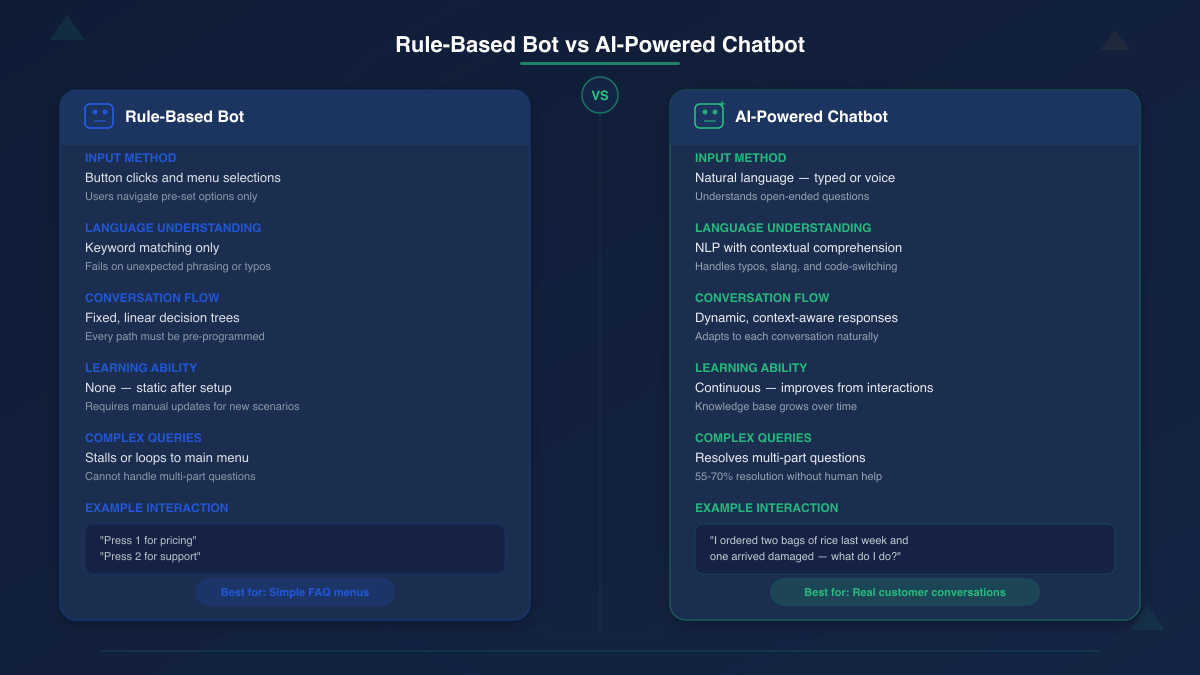
A rule-based chatbot follows pre-programmed scripts. It presents menus, waits for button clicks, and routes conversations down fixed paths. If a customer asks something outside the script, it stalls.
An AI-powered chatbot uses natural language processing (NLP) to understand open-ended questions. It’s trained on your business knowledge — FAQs, product catalogs, policies — and generates contextual responses. It learns from interactions and improves over time.
The difference matters. A rule-based bot can handle “Press 1 for pricing.” An AI chatbot can handle “I ordered two bags of rice last week and one arrived damaged — what do I do?”
Advanced AI chatbots with access to a company’s knowledge base resolve between 55% and 70% of queries without human intervention. That’s not a novelty. That’s a support team multiplier.
Step 1: Choose Your WhatsApp Business API Access Route
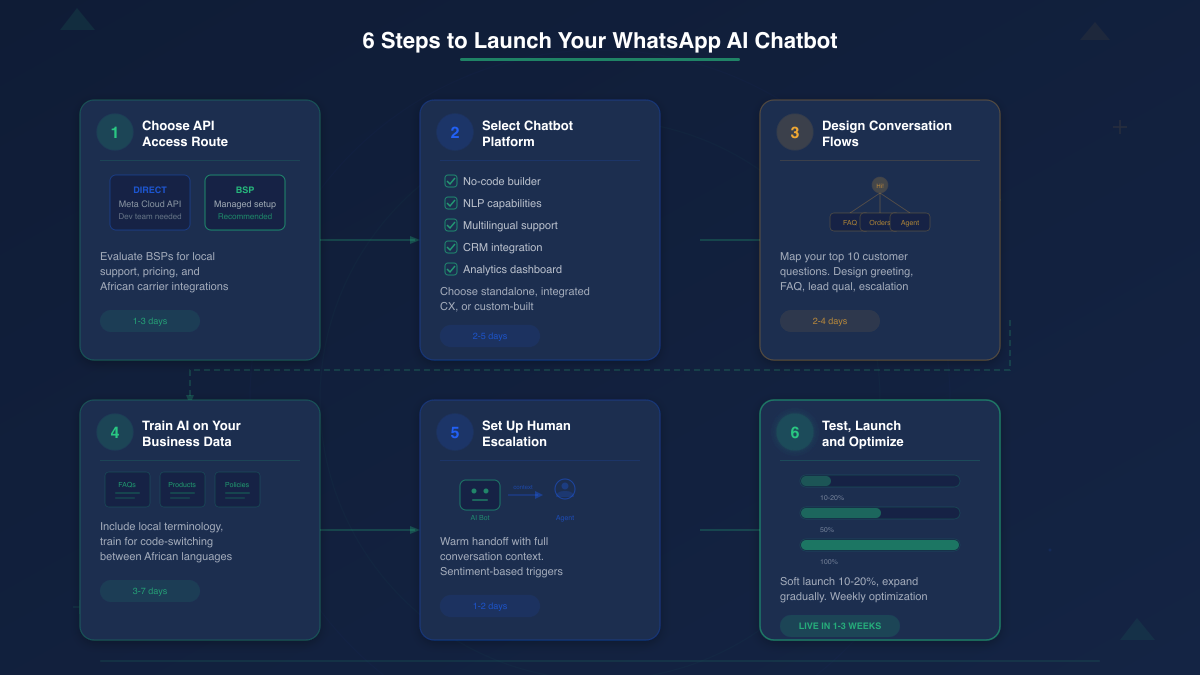
You can’t run an AI chatbot on the free WhatsApp Business App. You need the WhatsApp Business API. There are two paths to get it.
Direct Integration with Meta
You apply directly through Meta’s Cloud API. It’s free to set up, but you need developer resources to build and maintain the integration. You handle hosting, compliance, webhook management, and ongoing updates yourself.
This route works for companies with dedicated engineering teams. For most African businesses, it adds unnecessary complexity.
Through a Business Solution Provider (BSP)
A BSP handles the technical infrastructure for you. They manage API hosting, provide a user-friendly dashboard, and often bundle chatbot-building tools into the platform.
This is the route most African businesses should take. Here’s what to evaluate when choosing a BSP for African markets:
- Local presence and support. Can you reach support during your business hours? Do they understand your market?
- Pricing transparency. BSP onboarding fees can reach $1,000, and pricing varies dramatically between providers. Look for clear, published pricing with no hidden per-message markups.
- African carrier integrations. Direct connections with MTN, Vodafone, AirtelTigo, and other local networks improve delivery reliability.
- Built-in AI and automation tools. Some BSPs offer API access only. Others — like Arkesel’s WhatsApp Business API — bundle chatbot capabilities, making it one fewer tool to integrate.
Don’t sign a long-term contract before testing the platform. Request a trial or pilot period.
Step 2: Select Your AI Chatbot Platform
With API access sorted, you need a platform to build and run the AI chatbot itself. Some BSPs include this. Others don’t — meaning you’ll need a separate chatbot tool that connects to your WhatsApp API.
Here’s the evaluation framework:
No-Code or Low-Code Builder
Your marketing or CX team should be able to build and update conversation flows without filing engineering tickets. Drag-and-drop builders, visual flow editors, and template libraries matter.
AI and NLP Capabilities
Not all “AI chatbots” are truly AI. Some are glorified decision trees with an AI label. Look for platforms that support:
– Natural language understanding (not just keyword matching)
– Knowledge base training (upload your docs, FAQs, product info)
– Continuous learning from conversation logs
Multilingual Support for African Markets
This is non-negotiable for African markets. Your chatbot needs to handle English, French, Swahili, Twi, Yoruba, or whichever languages your customers use. Code-switching — mixing English with a local language mid-sentence — is common on WhatsApp across Africa. Your platform should handle it gracefully, not break.
CRM Integration
Every chatbot conversation generates customer data. If that data lives in a silo, you’re missing the point. The platform should integrate with your CRM or — better — include one. Understanding the difference between CRM vs. marketing automation will help you choose the right integration approach.
Analytics and Reporting
You need visibility into resolution rates, response times, common questions, drop-off points, and customer satisfaction. Without analytics, you’re flying blind.
Platform Types: Three Options
Standalone chatbot builders connect to your WhatsApp API and handle conversation automation. Good for simple FAQ bots. Limited when you need cross-channel visibility.
Integrated CX platforms combine chatbot, shared inbox, CRM, and analytics in one system. These are ideal when WhatsApp is one part of a broader customer experience strategy. You get one dashboard instead of four disconnected tools.
Custom-built solutions give maximum flexibility but require engineering resources to build and maintain. Best for enterprises with unique workflow requirements.
For most African businesses, an integrated platform offers the best balance of power and speed to market. You avoid stitching together multiple vendors — and the best omnichannel communication platforms already bundle everything you need.
Step 3: Design Your Chatbot Conversation Flows
Don’t start building in the platform. Start with a document.
Pull your top 10 customer questions from support tickets, call logs, and existing WhatsApp conversations. These are the flows your chatbot needs to handle on day one.
Core Flows to Map
Greeting and language selection. Offer language options upfront. In multilingual markets, this single step determines whether customers engage or abandon.
FAQ handling. Product information, business hours, location, return policies. These are the queries that eat your team’s time but don’t need human judgment.
Lead qualification. Ask two or three questions to identify what the customer needs and route them to the right next step — a product page, a sales rep, or an automated response.
Order status and tracking. Connect to your order management system so the chatbot can pull real-time status without a human lookup.
Appointment or callback booking. Let customers self-schedule instead of waiting for a reply.
Escalation to a human agent. Every flow should include a clear path to a real person. More on this in Step 5.
African Market Design Considerations
Keep menus concise. Many users are on slower connections or older devices. Long lists and complex nested menus create friction. Three to five options per level is the sweet spot.
Design for both text and buttons. WhatsApp supports interactive buttons and list messages, but some users prefer typing. Your chatbot should handle both input styles.
Account for data cost sensitivity. Keep media files (images, documents) optional rather than required. Not every customer is on unlimited data.
Use conversational language. Match the tone your customers use on WhatsApp — direct, informal, practical. Don’t write chatbot responses that sound like a legal document.
When manual responses let customers down, the business impact is real. Slow response times and dropped conversations are among the most common bad customer service examples — and they’re exactly what a well-designed chatbot eliminates.
Step 4: Train Your AI on Your Business Knowledge
This is where AI chatbots separate from basic bots. You’re teaching the AI to understand your business — not just follow a script.
Building Your Knowledge Base
Upload everything the chatbot might need to answer questions:
- FAQs and support documentation. The answers your team gives repeatedly.
- Product catalogs and pricing. Detailed enough that the chatbot can compare products and recommend options.
- Company policies. Return policies, shipping timelines, warranty terms, payment methods.
- Objection handling. Common pushback from customers and the responses that convert.
Training Best Practices
Start narrow. Don’t try to automate everything at once. Pick one use case — customer support FAQ, for example — train the AI on that, test thoroughly, and then expand.
Test with real queries. Don’t just test the happy path. Throw curveballs: misspellings, incomplete questions, slang, code-switching between languages. Your customers will.
Build in personality. The chatbot represents your brand. It should sound like your company — professional but not robotic, helpful but not verbose.
Africa-Specific Training Tips
Include local terminology. “Momo” for mobile money. “Mpesa” or “MTN MoMo.” Product names customers actually use versus official names.
Train for code-switching. A customer might start in English and switch to Pidgin, Twi, or Sheng mid-conversation. The AI should maintain context when this happens.
Account for informal communication styles. WhatsApp conversations across Africa tend to be more conversational than email. Train the chatbot to understand casual phrasing without losing accuracy.
Ready to skip the complexity? See how Kova IQ handles the majority of customer queries automatically while giving you real-time analytics — no manual AI training required.
Step 5: Set Up Human Escalation and Handoff
Even the best AI chatbot isn’t a complete replacement for human agents. Kova IQ’s AI bot handles the majority of customer queries automatically, escalating only complex ones to humans. The conversations that do reach your team need a seamless handoff experience.
When to Escalate
Build clear escalation triggers into your chatbot:
- Sentiment detection. The customer is frustrated, using negative language, or repeating the same question. Route to a human immediately.
- Complexity threshold. The query involves multiple products, a dispute, or a situation the AI wasn’t trained for.
- Explicit request. The customer asks to speak with a person. Never trap them in a bot loop.
- High-value transactions. Large orders, enterprise inquiries, or partnership discussions deserve human attention.
The Warm Handoff
A cold handoff — where the customer has to repeat everything to the human agent — is worse than no handoff at all.
A warm handoff means the AI summarizes the conversation and passes the full context to the agent. The customer doesn’t start over. The agent sees the chat history, the customer’s question, and what the bot already tried.
This is where integrated platforms have a significant advantage. When your chatbot, shared inbox, and customer database live in the same system, the agent gets the complete picture — across WhatsApp, Instagram, Facebook, Telegram, and live chat — without switching tools.
You can see this pattern in action across omnichannel customer experience examples where the channel switch is invisible to the customer.
Step 6: Test, Launch, and Optimize
Pre-Launch Checklist
- Test all conversation flows internally — every path, not just the primary ones
- Verify AI responses for accuracy against your knowledge base
- Test escalation triggers and confirm human agents receive proper context
- Check response times under load (can the platform handle your expected volume?)
- Verify multilingual flows work correctly, including code-switching scenarios
- Test on different devices — Android, iOS, WhatsApp Web, older phone models
Launch Strategy
Don’t flip the switch for 100% of your traffic on day one.
Soft launch: Route 10-20% of incoming WhatsApp conversations to the chatbot. Monitor resolution rates and customer satisfaction closely.
Expand gradually: As confidence builds, increase the percentage. Add new use cases one at a time.
Set a 48-hour review window: After launch, review every conversation log for the first 48 hours. Catch issues before they become patterns.
Optimization Cycle
The chatbot improves only if you actively optimize it. Build this into your weekly workflow:
- Review conversation logs. Identify queries the AI handled poorly or couldn’t resolve.
- Retrain on gaps. Add new knowledge base entries for common misses.
- Track key metrics. Resolution rate, average response time, escalation rate, customer satisfaction score.
- Expand scope. Once one use case runs reliably, add the next.
What Success Looks Like
The results from African businesses that have implemented WhatsApp chatbots speak clearly. Digify Africa’s WhatsApp chatbot enabled 136,000 people to complete training in under one year — compared to 120,000 in 11 years of traditional operations.
Pumpkn, a South African fintech, deployed a WhatsApp chatbot and automated 70% of manual work, boosted completion rates to 74%, and drove 150+ monthly inbound leads.
These aren’t incremental improvements. They’re operational transformations.
WhatsApp AI Chatbot Costs: What African Businesses Should Expect
Pricing for WhatsApp chatbots has three layers. Understanding each one prevents surprise invoices.
Layer 1: Meta’s Conversation-Based Pricing
Meta charges per conversation, not per message. A conversation is a 24-hour window of messages between your business and a customer.
The major cost shift: WhatsApp made service conversations free globally in late 2024. If a customer initiates a conversation and you respond with support, you pay nothing for Meta’s portion. Marketing and utility conversations (outbound campaigns, order notifications) still carry per-conversation fees that vary by country.
Layer 2: BSP Platform Fees
Your BSP charges a monthly subscription and may add a per-message or per-conversation markup on top of Meta’s fees. This is where costs vary the most — and where businesses need to read the fine print.
Some BSPs offer free tiers for low-volume usage. Others charge onboarding fees that can reach $1,000. Compare total cost of ownership, not just the headline subscription price.
Layer 3: AI/Chatbot Platform Fees
If your BSP doesn’t include chatbot functionality, you’ll pay separately for a chatbot platform. This adds another monthly subscription and often usage-based pricing tied to conversation volume or AI processing.
The integrated advantage: Platforms that bundle API access, chatbot, inbox, and analytics into one subscription eliminate the cost stacking problem. You pay one price instead of three.
How Kova IQ Simplifies the Entire Process
The setup process above involves multiple decisions, vendors, and integrations. Kova IQ consolidates them into a single platform built for African businesses.
Here’s what that looks like in practice:
WhatsApp Business API access through Arkesel as your BSP. No third-party onboarding. No multi-vendor complexity.
AI-powered chatbot trained on your business data. It resolves routine customer queries automatically — from FAQs to order status — escalating only the complex conversations to your team.
Unified inbox across WhatsApp, Instagram, Facebook, Telegram, and live chat. Your agents work from one screen, with full conversation history regardless of channel.
Real-time sentiment analysis that flags frustrated customers before they escalate. The AI tracks satisfaction signals across every conversation.
Customer intelligence dashboard with automated daily analytics. Track resolution rates, response times, and customer satisfaction trends without building custom reports.
Customer database built from conversations. Every interaction enriches your understanding of each customer — enabling targeted campaigns through the SMS Platform or WhatsApp broadcasts. See our guide on how to build a customer database from WhatsApp conversations for the complete framework.
No code required. No multi-tool stack. One platform, live in days.
Get started with Kova IQ and set up your AI-powered WhatsApp chatbot — built for African businesses, live in days.
FAQ: WhatsApp AI Chatbot for African Businesses
Do I need the WhatsApp Business API for a chatbot?
Yes. The free WhatsApp Business App doesn’t support chatbot integrations or automation APIs. You need the WhatsApp Business API (accessed through a BSP like Arkesel) to connect an AI chatbot. The API handles message routing, webhook events, and the technical infrastructure that chatbots depend on.
How much does a WhatsApp chatbot cost in Africa?
Costs depend on three layers: Meta’s conversation fees (service conversations are now free), your BSP’s platform fees (varies from free tiers to $1,000+ onboarding), and the chatbot platform subscription. An integrated platform like Kova IQ bundles all three into a single subscription, reducing total cost. Check current pricing for specific plans.
Can I create a WhatsApp chatbot without coding?
Yes. Most modern platforms offer no-code visual builders for designing conversation flows. You drag and drop elements, set up triggers, and train the AI by uploading documents — no programming required. Kova IQ’s AI chatbot is configured through a dashboard, not a code editor.
How long does it take to set up a WhatsApp AI chatbot?
With a BSP that handles API provisioning, you can have a basic chatbot live within a few days. The timeline depends on complexity: a simple FAQ bot takes days, while a fully trained AI chatbot with CRM integration, multilingual support, and custom escalation flows typically takes one to three weeks.
What languages can WhatsApp chatbots support?
AI-powered chatbots can support any language they’re trained on. For African markets, this includes English, French, Swahili, Yoruba, Twi, Pidgin English, and others. The key is training the AI with content in those languages and testing for code-switching (when customers mix languages mid-conversation).
Can I use a chatbot and still talk to customers directly?
Absolutely. The chatbot handles routine queries automatically and escalates complex ones to your human agents with full conversation context. Your team still handles the conversations that need a personal touch — they just spend zero time on repetitive FAQ-type questions. With SMS vs voice for business, you can even offer callback options for customers who prefer speaking directly.
Related Articles
- Customer Sentiment Analysis: A Practical Guide for African Enterprises — Learn how to implement sentiment analysis across WhatsApp, SMS, voice, and USSD to understand how your customers feel in real time.
- WhatsApp vs SMS vs Voice: Choosing the Right Channel Mix for African Customers — A practical decision framework for building the right WhatsApp, SMS, and voice channel mix for African businesses.
- How to Build a Customer Database from WhatsApp Conversations — Extract, structure, and activate customer data from WhatsApp conversations using manual, API, and AI-powered methods.
- WhatsApp AI Features for Business in South Africa: What You Can Do in 2026


